Construction Scheduling Software for GCs and Owners
Shackleton keeps your master schedule, critical path, and three-week look-aheads in the same system as each job’s field reports, RFIs, and budget. Built for GCs, subs, owners, and developers.
Trusted by companies building the future













Construction Scheduling Software Built Into the Job Record
Construction scheduling software holds the plan for when each part of a job happens and in what order. In Shackleton, the schedule sits in the same project record as the budget, RFIs, and daily reports, so the office and the field work from one set of dates.
Gantt Charts and Milestones
Lay out activities, durations, and dependencies, with the milestones your owner tracks.
Critical Path
Shackleton calculates the critical path from your dependencies, so you see which activities set the finish date and which have room to slip.
Three-Week Look-Aheads
Give each trade a near-term plan drawn from the master schedule.
Owner View
Owners and multi-site operators see milestone status across every job without calling the builder.
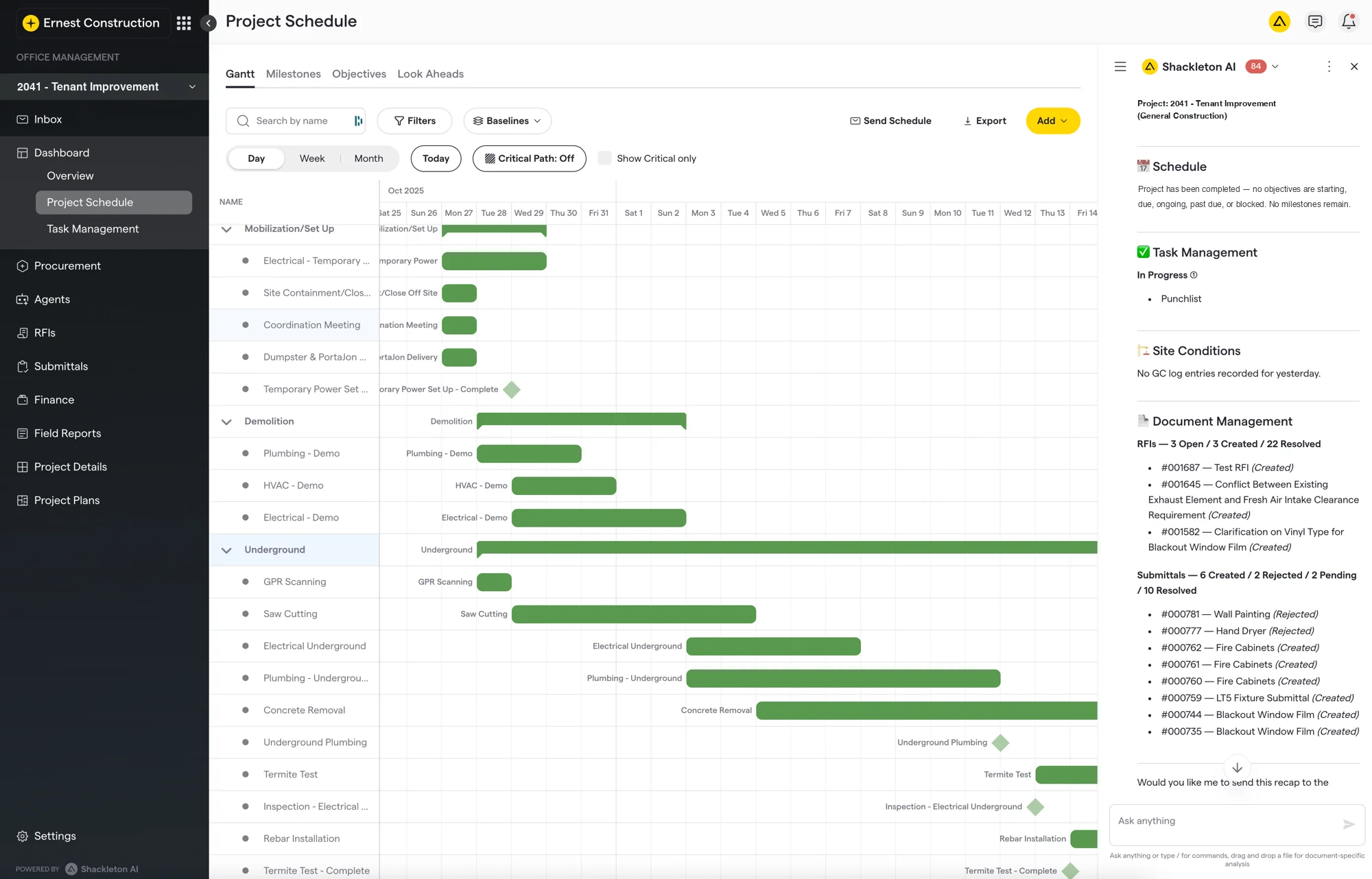
The product page shows the modules the schedule connects to, from bid management to the Communication Hub.
From the Master Schedule to the Three-Week Look-Ahead
The three-week look-ahead is where the master schedule meets the crews doing the work. In Shackleton, the plan goes out to the trades and progress comes back to the schedule in four steps.
01
Set the Master Schedule
The project manager sets the logic, durations, and milestones for the whole job.
02
Pull Each Trade’s Look-Ahead
Each subcontractor’s next three weeks come from the master schedule, in the same sequence.
03
Update From the Field
A superintendent’s daily log updates the schedule automatically, and Shackleton’s agents flag an unanswered RFI about to delay a trade.
04
Read the Day’s Recap
Shackleton’s agent summarizes what changed that day, from new RFIs to submittals, beside the schedule.
Results From Running on One System
Shackleton powers construction teams across 15+ states, managing over $1 billion in project value. It started inside Ernest, a general contractor that kept its construction schedule in Microsoft Project, its bids and accounting in other tools, and its project managers busy keeping them in sync.
annual revenue as a self-performing commercial GC
Ernest
a week per project manager moving data between tools before
Ernest
Original data
Ernest was a self-performing GC, and its project managers each spent about 15 hours a week moving data between the schedule, bid, and accounting tools. Once the company ran on one system, revenue per project manager roughly doubled with the same team.
Method: the founders’ own account of running Ernest, published in What I Learned Running a $35M General Contractor (July 2026).
Shackleton changed how we think about running our business. We went from chasing paperwork to actually leading our projects.
Emmanuel N.
Chief Growth Officer, ProMD Health
I never knew what was happening on my jobs before Shackleton and I was constantly calling my builder. Now I know exactly what’s going on without having to ask any questions.
Matt G.
Ops Manager, Multi-Brand Franchise Operator
See Your Schedule in Shackleton
Walk through a live project schedule with our team, from the master schedule to this week’s look-ahead.
About Shackleton
Shackleton is the agentic platform for construction, built for general contractors, subcontractors, owners, and developers. It covers the job from estimating and bidding through closeout and syncs costs with QuickBooks, Sage, and more. Its custom agents take on one stage of the job apiece, doing the grunt work of moving data between systems and flagging what changed on site. Read how the company started on the about page.
Start With One of Your Own Jobs
See how a schedule runs alongside the field reports and budget.
What Is Construction Scheduling Software?
Construction scheduling software, also called construction project scheduling software, is a program for planning the order and timing of work on a construction job and keeping that plan current as the job moves. A construction schedule built in it usually has six parts.
- Activities
- The tasks that make up the project scope.
- Durations
- How long each activity is expected to take.
- Dependencies
- The links that tie one activity’s start or finish to another’s.
- Milestones
- Fixed dates for major events, such as dry-in or substantial completion.
- Critical path
- The chain of activities that sets the earliest finish date.
- Baseline
- The approved plan that progress is measured against.
Online construction scheduling software keeps the schedule on the web, so the office and the field open the same version. Construction management scheduling software also keeps it with the rest of the project’s records.
Construction Scheduling Methods Compared
Construction scheduling methods differ in what they show and who works from them, and most jobs use more than one. Construction scheduling tools often support only some of the five below, so check the list when you compare construction scheduler software.
| Method | What It Shows | Who Works From It | When It Fits | In Shackleton |
|---|---|---|---|---|
| Gantt chart | Activities as bars against a calendar | Project managers, owners | Showing the whole job at a glance | Yes |
| Critical path method (CPM) | The chain of activities that sets the finish date | Schedulers, project managers | Jobs with many dependent activities | Yes |
| Three-week look-ahead | The next three weeks of work, drawn from the master schedule | Superintendents, subcontractors | Weekly coordination in the field | Yes |
| Pull planning | A sequence the trades build together, working back from a milestone | Trade partners, superintendents | The start of a phase | No |
| Line of balance | The rate repeated work moves through units or floors | Project managers | Repeated scopes such as multifamily floors or retail rollouts | No |
Shackleton covers the first three: Gantt charts, the critical path, and three-week look-aheads.
What to Prepare Before Moving Your Construction Schedule
A construction schedule moves into Shackleton faster with four things ready before onboarding starts, whether it lives today in Microsoft Project, a PDF, or other construction planning tools.
Baseline and Milestones
The current schedule file, so your construction project schedule software starts from the dates you have committed to the owner.
Subcontractor List
Each trade on the job, with a current contact.
Open RFIs and Change Orders
Anything that could move the next three weeks of work.
Look-Ahead Owner
The person who updates each trade’s look-ahead every week.
Frequently Asked Questions
What Is a Three-Week Look-Ahead Schedule?
A three-week look-ahead is a rolling plan of the next three weeks of work, drawn from the master schedule and usually updated weekly. Superintendents use it to confirm crews, materials, and inspections are lined up before the work starts.
What Is the Critical Path in a Construction Schedule?
The critical path is the longest chain of dependent activities in a schedule, and it sets the earliest date the job can finish. A delay to any activity on it delays the finish unless the work is re-sequenced. Activities off the critical path have float, meaning time they can slip without moving the finish date.
How Do You Build a Construction Schedule?
List the activities in the scope, estimate how long each takes, and link each one to the activities it depends on. Then set milestones, save the result as the baseline, and update it as work is completed. Most construction scheduling programs follow this order.
Does Shackleton Have a Construction Scheduling App for the Field?
Yes. On the iOS and Android app, superintendents view and update the schedule and each subcontractor’s look-ahead from the jobsite, and file each day’s report and site photos alongside them.
Is There Free Construction Scheduling Software?
Free construction schedule software can draw a Gantt chart, and a spreadsheet can hold a simple schedule. Paid construction scheduling software programs add the critical path and look-aheads. Shackleton is one of them, and it also ties the schedule to each job’s field reports and budget.
How Often Should a Construction Schedule Be Updated?
Most contractors update the master schedule at least once a month, often in step with the pay application. Each update records actual progress against the baseline, which shows which activities have slipped and whether the critical path has moved.
Can I Import My Existing Schedule?
Yes. Shackleton imports schedules from Microsoft Project or any schedule PDF, so a job already planned elsewhere doesn’t have to be rebuilt by hand.
Keep the Schedule With the Rest of the Job
One system for the master schedule, the look-aheads, the field record, and the budget.